 Track-Details
Every track you play, named on stream.
Track-Details watches your DJ software, puts the song on your OBS overlay the moment you mix it in, and gives you the story behind it for the mic: who wrote it, who produced it, where it charted.
14 days free with every feature. Then $9.99 once, no subscription. Works on 2 computers.
The real overlay, cycling through example tracks.
Set it up once, then just play.
No typing track names, no browser tabs, no scripts to babysit. Track-Details follows your decks from the first song to the last.
Finds your DJ software by itself
Open Serato or VirtualDJ and Track-Details picks it up within seconds, then follows every track change on its own. Record-label tags and asterisks are cleaned off titles.
An overlay your stream can wear
A spinning-record card with album art slides in on every change. Paste one address into OBS, on the DJ computer or on a separate streaming laptop on the same network.
Song facts for the mic
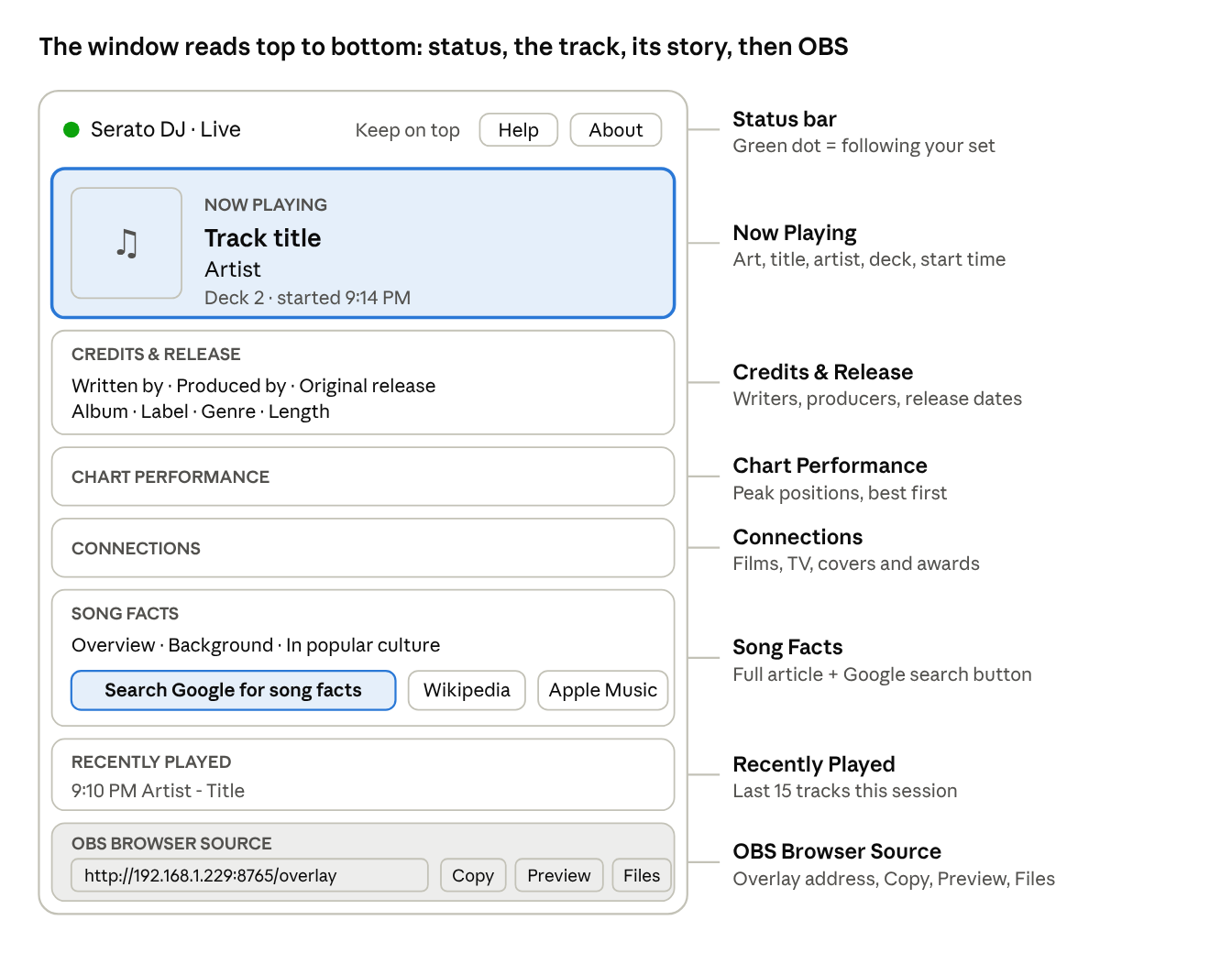
Credits, original release date, chart peaks, the films and shows that used the song, and its full story, in the window while it plays. One click opens a Google search for more. How DJs get song facts →
Files for your own tools
A text file for OBS Text sources, JSON for custom overlays and scripts, and a dated setlist of everything you played, saved automatically. Managing & analyzing your tracks →
Give your audience the story behind every song.
Listeners tune in for the music and stay for the person playing it. Track-Details hands you the details worth sharing, so every break on the mic says more than a title and an artist.
-
Talk breaks with something to say
Who wrote it, who produced it, when it first came out, how high it charted and which films used it. It's all on screen while the record plays, ready for your next break.
-
Answer "what's this song?" before it's asked
The title and artist go up on your stream the moment the track changes, so your chat sees what's playing and can talk about it with you.
-
No prep, no tabs, no typing
The facts are looked up automatically for every track you play, even the ones you didn't plan. You stay on the decks and keep the mix going.
-
Show notes that write themselves
A dated setlist of every song you played is saved for you, ready for your tracklist, your show archive or your next post.
"That was Jamming by Bob Marley & The Wailers, written by Marley himself, from the 1977 album Exodus on Island Records."
Three steps to your first live title.
-
Install
Drag Track-Details into Applications and allow the folder access macOS asks for.
-
Play
Start Serato DJ or VirtualDJ. The status dot turns green once a track is live.
-
Add it to OBS
Add a Browser Source with the address the app shows you, for example:
http://192.168.1.229:8765/overlay
Everything about the track, in one window.
Jamming
Bob Marley & The Wailers
- Written by
- Bob Marley
- Album
- Exodus
- Original release
- 1977
- Label
- Island
Facts come from Wikipedia, Wikidata, MusicBrainz and iTunes, looked up in a few seconds each time the track changes.
Before you ask.
Does it need the internet?
Only for song facts and album art. Track detection, the overlay and the files all work offline, so a gig with bad Wi-Fi still gets titles on stream.
Which DJ software does it support?
Serato DJ (Pro and Lite) and VirtualDJ today. VirtualDJ needs its writeHistory option turned on, which takes one click.
Can OBS run on a different computer?
Yes. If your stream runs on a separate laptop, point its browser source at the network address Track-Details shows. Both computers just need to be on the same network.
Which Mac do I need?
Any Mac with macOS 12 Monterey or later. There are two downloads: one for Apple Silicon Macs (M1, M2, M3, M4) and one for Intel Macs. To check yours, open the Apple menu and choose About This Mac. If it lists a Chip such as Apple M1, use the main download. If it lists a Processor with Intel in the name, use the Intel version. The wrong one shows "not supported on this Mac". Your license works with either.
Is there a Windows version?
Mac comes first. Windows is next on the list.
How much does it cost?
$9.99 (USD), once. Track-Details is a one-time purchase, not a subscription. One license covers two computers, such as your DJ laptop and a backup. Try everything free for 14 days first.
How do I unlock it after buying?
Your license key is emailed to you after checkout. In Track-Details, open License…, paste the key and click Activate. Moving to a new computer? Deactivate on the old one first.
I lost my license key. How do I get it back?
Go to the license lookup page and enter the email you paid with. You'll get a sign-in link that shows your key and the computers using it. You can also write to support@track-details.com.
Put your track names on stream tonight.
Try it free for 14 days, then buy once for $9.99 to keep it. One license works on 2 computers. Secure checkout by Stripe.
Questions? support@track-details.com